Bybit language change allows users to switch the interface language on both the website and mobile app for a more comfortable trading experience.
Bybit is a global cryptocurrency exchange that supports multiple languages across its platform, making it easier for users from different regions to navigate and trade.
If you are new to Bybit or want to adjust the interface language,
knowing how to change the language settings correctly can significantly improve usability.
In this guide, we cover:
- The full list of languages supported by Bybit
- How to change the language on the Bybit website (PC)
- How to change the language on the Bybit mobile app
This article also includes information on how to apply fee discounts when using Bybit. before you start trading.
Supported Languages on Bybit (Language Settings)
Bybit allows users to choose from a wide range of languages to accommodate its global user base.
Bybit Supported Languages
- English
- Bahasa Indonesia
- Español (International)
- Español (México)
- Español (Argentina)
- Қазақша (Kazakh)
- Português (Brasil)
- Português (International)
- Русский (Russian)
- Tiếng Việt (Vietnamese)
- Українська (Ukrainian)
- العربية (Arabic)
- 日本語 (Japanese)
- 简体中文 (Malaysia)
- 繁體中文
Users can select their preferred language on both desktop and mobile environments.
Bybit Language Change on the Website (PC)
Changing the language on the Bybit website is quick and straightforward.
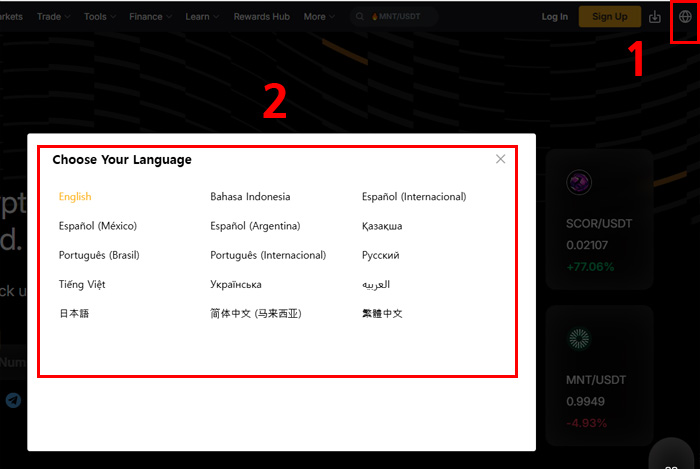
Steps
- Visit the official Bybit website
- Click the globe icon (🌐) in the top-right corner
- Select your preferred language from the list
- The language is applied instantly across the site
No additional confirmation is required, and the change works both before and after login.
Bybit Language Change on the Mobile App
On the Bybit mobile app (iOS and Android), the language can be changed through the profile and settings menu.
Step 1: Open Profile

Launch the app and tap the profile icon in the top-left corner.
Step 2: Go to Settings

Tap the settings icon (⚙️) in the top-right corner of the profile screen.
Step 3: Select Language

In the User Center, tap the globe icon (🌐) to access language settings.
Step 4: Choose Your Language

Select your preferred language from the list.
The app language will change immediately without restarting.
Apply Bybit Fee Discounts Before Trading
After completing the language setup, it is recommended to apply fee discounts before placing your first trade.
Bybit offers special benefits when signing up through a referral link.
Bybit Fee Discount Benefits
- Up to 20% trading fee discount
- Additional rewards of up to 30,000 USDT
- Applicable to both spot and derivatives trading
You can activate these benefits automatically by signing up through the link below.
This offer applies to new accounts only.
Notes on Bybit Language Settings
- Language settings may be applied per device or environment
- Website and mobile app languages may need to be set separately
- Changing the language does not affect account data, funds, or trading history
- Some announcements may appear earlier in certain languages
Language settings can be changed at any time.
Related Bybit Guides
After setting your language and applying fee discounts, these guides can help you better understand how to use Bybit efficiently.
Conclusion
Bybit language settings can be adjusted easily on both desktop and mobile platforms.
With support for multiple global languages, users can customize the interface for a smoother trading experience.
Before trading, completing both language setup and fee discount activation can help reduce costs and improve overall usability.